


















Want to buy Bitcoin on BTZO? It’s fast and easy. You don’t need to give your ID or use a bank. Just deposit crypto like USDT, find the right spot, and swap it for Bitcoin. You can do it in the main market or use the quick converter. This guide shows you the simple steps.
What is Bitcoin?
Bitcoin is the first and biggest digital coin. People buy it because they think the price will go up later. Some people trade it daily. Others just want to own a piece of it. You can buy any amount, even a tiny fraction. BTZO lets you get it easily.
Why Use BTZO for Bitcoin?
BTZO is simple and direct.
- No KYC: You don’t need to show your ID or passport.
- No Bank Needed: You don’t connect your bank account.
- Simple for Beginners: The website is clean and not confusing.
- Two Main Ways to Buy: Use the trading market or the quick converter tool.
How to Buy Bitcoin
There are multiple ways to have bitcoins in your digital wallet, and below are some steps out of a few of them.
Step 1: Get Some USDT First
You can’t use cash (like dollars) on BTZO. You need cryptocurrency first. The most common one is Tether (USDT). Think of USDT as a digital dollar. You need to get USDT from somewhere else and send it to your BTZO wallet.
How to Get USDT:
Buy it on another exchange that takes cash, or get it from a friend.
How to Deposit USDT to BTZO:
- Log into your BTZO account.
- Go to your Wallet.
- Click Deposit and choose USDT.
- BTZO will show you a deposit address (a long code). Copy it.
- From wherever your USDT is (another exchange, a friend), send it to that address.
- Wait for it to arrive. It usually takes a few minutes.
Step 2: Choose Your Method to Buy Bitcoin
You now have two simple options.
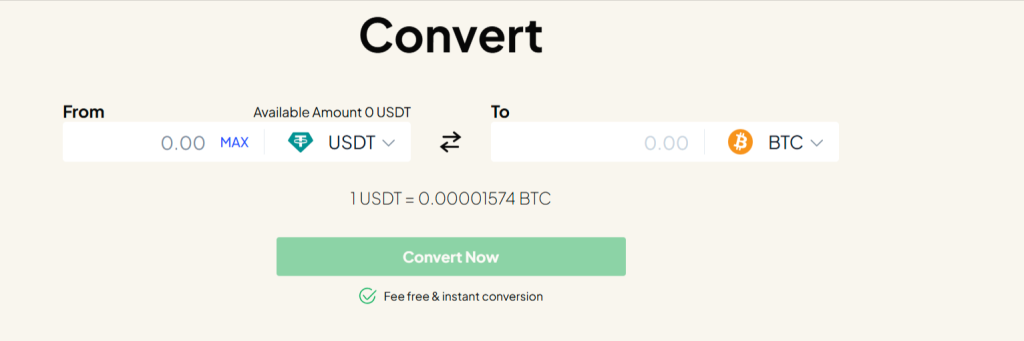
Option A: The Fast Converter (Easiest)
This is like a currency exchange counter.
- On the BTZO website, look for a tool called “Convert“.
- In the “From” box, select USDT.
- In the “To” box, select BTC (Bitcoin).
- Type how much USDT you want to spend.
- The tool will show you exactly how much Bitcoin you will get.
- Click “Convert”. Done. The Bitcoin goes straight to your wallet
Option B: The Trading Market (More Control)
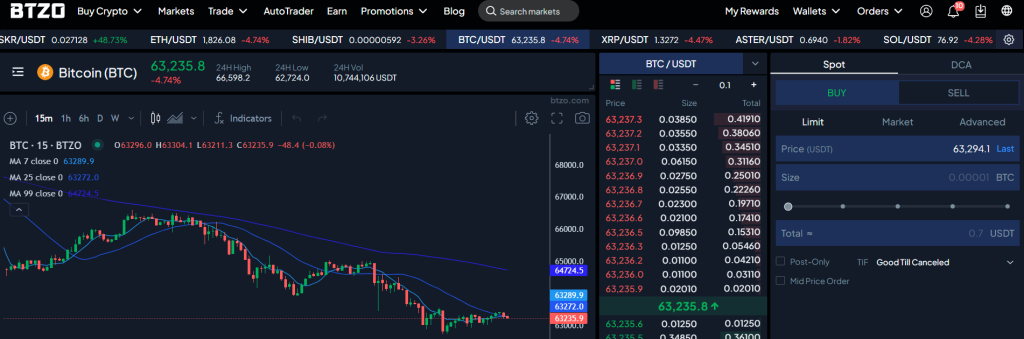
This is the main trading area where you buy directly from other users.
- Go to the “Markets” or “Trade” section.
- Search for the BTC/USDT trading pair.
- You’ll see a box to place an order. For your first time, use a “Market” order.
- In the amount box, type how much USDT you want to spend.
- Click “Buy BTC”.
- The order is filled instantly at the best available price.

Step 3: Your Bitcoin is Now in Your BTZO Wallet
After using either method, check your Wallet. You will see your new Bitcoin balance there. You can hold it, trade it later, or transfer it to your personal cryptocurrency wallet for safe storage.
Simple Safety Tips for Beginners
- Start Small: Use a small amount of money for your first try.
- Check Addresses Twice: Depositing USDT must be done in the same network as the source of the transfer, whether it is the TRC-20 network or the ERC-20 network.
- Use Strong Passwords: And turn on 2-Factor Authentication (2FA) in your account settings.
- Don’t Panic Buy: The price moves a lot. Don’t buy just because it’s shooting up fast.
Common Mistakes to Skip
- Trying to Deposit Cash: Remember, BTZO only takes crypto deposits (like USDT).
- Sending to Wrong Network: When depositing USDT, be sure to use the same network (such as TRC-20 or ERC-20) as the wallet you’re transferring from.
- Forgetting About Fees: Small network fees exist for deposits/withdrawals. The trading fee is shown before you click buy.
That's It! You Did It.
To buy Bitcoin on BTZO, just:
- Get USDT and deposit it,
- Use the Converter or the Market to swap it for BTC.
It’s a simple process with no ID checks or bank transfers needed. You own your Bitcoin in minutes.
Ready to start? Log into BTZO, deposit some USDT, and make your first swap.
Check Out: BTZO Campaign Center and stay updated on all ongoing trading events
FAQ
BTZO does not require KYC (identity verification) to trade or use the converter.
BTZO does not accept direct cash or bank payments. You must first get cryptocurrency like USDT from another platform and then send it to your BTZO wallet.
The Converter is a simple, fixed-price swap—fast and easy. The Market is where the real trading happens; it might give you a slightly better price, especially for larger amounts, but has a couple more steps.
