
































When you trade BTZO futures, you’re not just hitting a button. You’re sending a specific instruction, or an order type, to the exchange. These orders are Market, Limit, and Stop. These are your basic controls for how and when you get in or out of a trade. Getting them right is the first step to smart btzo futures trading. Let’s break them down so you know exactly what you’re telling the system to do.
The Significance of Futures Orders
Assume you are in a crowded marketplace. You may shout, “I’ll buy an apple at any price right now!” That’s one tactic. Alternatively, you may state, “I’ll only buy an apple if it costs less than a dollar.” That’s a different plan. In crypto futures trading, you need that same kind of control.
The amount you pay and the time of your move are determined by the sequence you select. You could lose actual money if you choose the incorrect one. Do you want to follow a rapidly evolving trend? Need to buy at a specific number? Want to sleep at night knowing your loss is capped? Each goal needs a different order. This guide walks you through the three main ones you’ll use.
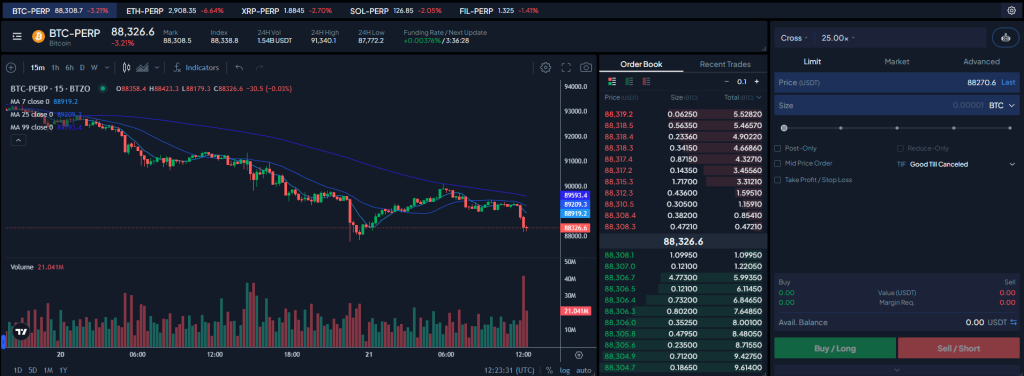
The Three Main Orders You Need to Know
Let’s look at the core tools in your crypto futures market toolbox.
Market Order: The "Right Now" Button
What it is:
A market order is the fastest way to trade. It tells the exchange, “Buy (or sell) this for me immediately at whatever the best current price is.”
When to use it:
Use this when speed is everything. You see a chart making a sudden move and you need to be in the trade this second. Or, you’re in a losing position and need to get out fast to stop the bleeding. The price might be a little different than you hoped, but the trade will happen.
What it costs:
On BTZO, a market order usually has a slightly higher fee (called a “taker” fee) because you’re taking an offer that’s already on the books.
You can read more abouttrading fees and how they work on our guide on BTZO Trading Fees
Limit Order: The "On My Terms" Button
What it is:
A limit order is about control. You set your price. It tells the exchange, “Only buy this if it drops to $X or lower,” or “Only sell this if it rises to $Y or higher.”
When to use it:
This is your go-to for planned trades. You think Ethereum will dip to $3,400 before going up? Set a buy limit order there. Want to sell your Solana for a 20% profit? Set a sell limit order at your target price. It won’t execute until your price is hit.
What it costs:
Because you’re adding your order to the book for someone else to take later, limit orders frequently have a cheaper fee (a “maker” fee).
Real-life example:
You wish to purchase Ethereum, but the price is just $3,400. Right now, it’s $3,500. You place a buy limit order at $3,400. You walk away. Later, the price dips to $3,400 and your order fills automatically. You got your perfect price. But if the price never drops to $3,400 and goes straight up, you miss the trade. You traded certainty on price for uncertainty on timing.
Stop Order: The "Safety Net" or "Breakout Catcher"
What it is:
A stop order (like a stop-loss) is an alarm that triggers a market order. You set a trigger price. If the market hits that price, it shouts “NOW!” and executes a market order to buy or sell.
When to use it:
This is your most important tool for managing risk. You use a stop order to automatically sell if a trade goes against you (stop-loss). You can also use it to buy if an asset breaks above a certain price, signaling a strong move might be starting.
What it costs:
Once triggered, it turns into a market order, so you’ll pay the standard market order (“taker”) fee.
Real-life example (Stop-Loss):
You buy a coin at $100. You’re okay with a $10 loss, but no more. You set a stop order (stop-loss) at $90. A bad news headline drops the price to $90. Boom! your stop order triggers and sells your position immediately at the next available price (maybe $89.80). Your loss is locked in at about $10. Done. No panic selling required.
Real-life example (Stop-Entry):
A token has been stuck between $50 and $55 for weeks. You think if it breaks above $56, it could run to $70. You set a buy stop order at $56.50. A week later, it surges to $57. Your order triggers, buying it for you right in the middle of the breakout move.
Putting It All Together: Which One Do I Click?
Let’s make it simple:
- Need it now and price isn’t your main worry? = Market Order
- Have a specific price in mind and are willing to wait? = Limit Order
- Need to protect yourself from a big loss or jump on a confirmed trend? = Stop Order
There’s no trophy for using the “best” one. The right futures order is the one that matches your plan for that single trade. Think of it like driving: sometimes you need to slam the gas (market), sometimes you need to cruise control (limit), and you always, always need good brakes (stop-loss). Getting comfortable with these three will make your time in BTZO futures much more controlled and a lot less stressful.
FAQ
That’s called slippage. In a super fast or thin market (not many buyers/sellers), the “best available price” can change between the moment you click and the moment the exchange fills your order. Your market order just takes whatever price is there, which can sometimes be a bit off, especially if you’re trading a large amount. It’s the cost of instant action.
Nope. A limit order guarantees your price, but not your fill. If the market never reaches your price, your order just sits there untouched. It’s perfect for getting the price you want, but you have to be okay with possibly missing the move entirely.
For most traders, yes, it’s non-negotiable. A stop-loss isn’t a prediction; it’s a plan. It’s you saying, “If I’m wrong about this trade, here’s exactly how much I’m willing to lose.” It takes the emotion out of a losing trade and prevents a small loss from turning into a portfolio-wrecking disaster. It’s the single easiest way to improve your btzo futures trading discipline.