














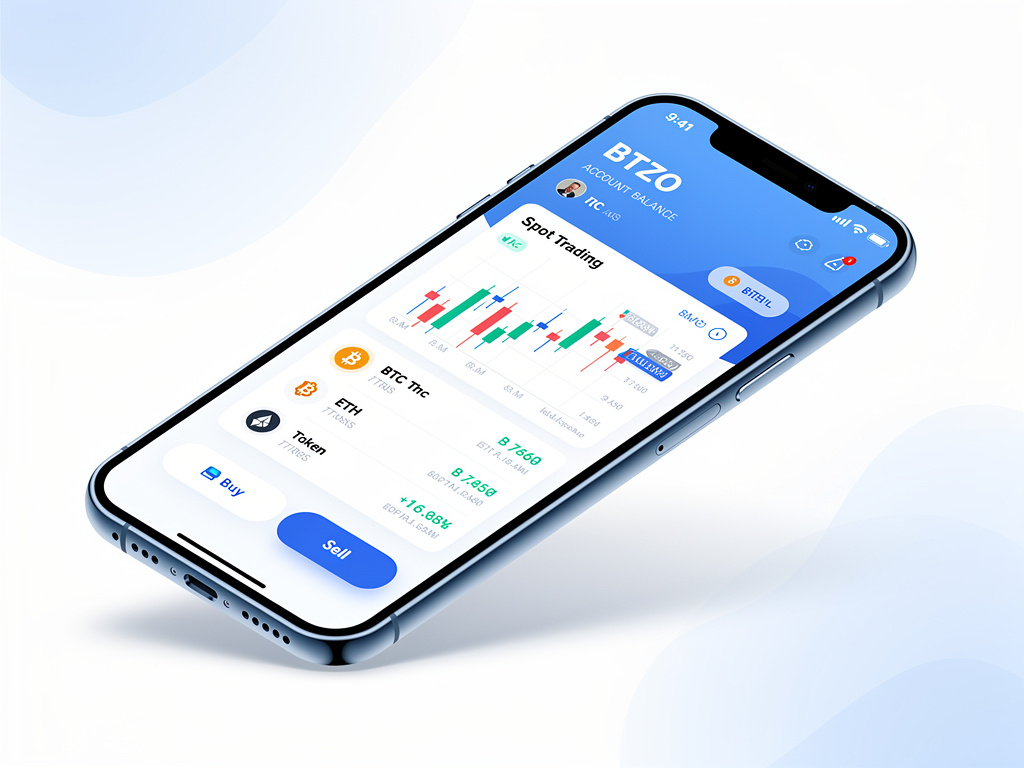
Exploring the BTZO App Dashboard: Features Every New User Should Know

btzo app dashboard

Gone are the days of being tethered to a desktop to trade effectively. The convenience of mobile trading means that your portfolio is always with you, ready to track, evaluate, and act. Finding an app that blends functionality and ease of use is crucial, though, given the abundance of apps available. Enter the BTZO App.It combines crucial functions like one-click trading, real-time portfolio tracking, and sophisticated charts into a simplified, user-friendly interface. The first stage is to get proficient with the dashboard. Let’s examine its essential elements so you may start trading with the assurance of a professional.

Here are the essential features you should understand straight away:

  • See live market data with top gainers and losers
  • Access quick trading tools with the center equilibrium button
  • Navigate easily between Home, Markets, Earn, and Wallet
  • Use Convert, OTC, and AutoTrader for different trading styles
  • Track your favorite coins and market movements

Learning the BTZO App dashboard helps you trade smarter from day one. This guide shows you exactly where everything is in this btzo trading app.

Navigating the BTZO App Dashboard

BTZO makes crypto trading simple for beginners. The BTZO App keeps everything organized on your phone. Your dashboard is like your trading command center. It helps you:

  • Watch market trends in real-time
  • Access different trading options quickly
  • Move between sections seamlessly
  • Manage your investments efficiently

The btzo trading app puts all these tools in one easy place.

What the Dashboard Shows You

Think of your dashboard as your crypto control center. It gives you instant access to everything you need.

The BTZO App dashboard helps you:

  • Monitor markets with live price data
  • Access quick tools through the center button
  • Navigate sections with the bottom menu
  • Make fast decisions with organized information

Everything is designed for quick access and easy understanding.
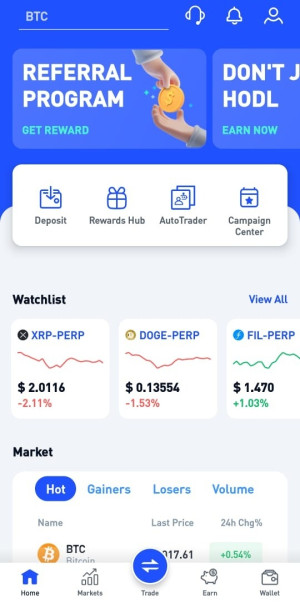
explore btzo app dashboard

Key Features You'll Use Every Day

Live Market Overview

The first screen shows real-time market data:

  • Market Tabs: Switch between Hot, Gainers, Losers, and Volume
  • Coin Listings: See BTC, ETH, SOL, XRP with prices and changes
  • Price Updates: Real-time percentage changes
  • Quick Scanning: Easily spot which coins are moving

Center Quick-Access Button

This horizontal menu provides one-tap entry to the app’s core trading and analysis features.

  • Favorites: This is your personalized watchlist for both Spot and Futures markets. Add the assets you monitor most frequently for easy access to their prices and charts.
  • Spot: Access the spot trading market to buy and sell over 150 cryptocurrencies directly. Trades are settled immediately at the current market price.
  • Trading Bots: Automate your trading strategies. This section allows you to set up and manage bots that can execute trades based on predefined rules and market conditions.
  • AutoTrader: This feature simplifies automated trading by allowing you to follow and implement strategies created by professional traders, all through a streamlined interface.
  • Convert: Instantly swap one cryptocurrency for another crypto at a predetermined rate without using the standard order book.
  • Buy / Sell: The direct on-ramp for purchasing crypto with your available digital coins. This is typically a simplified process for quickly acquiring or selling assets.
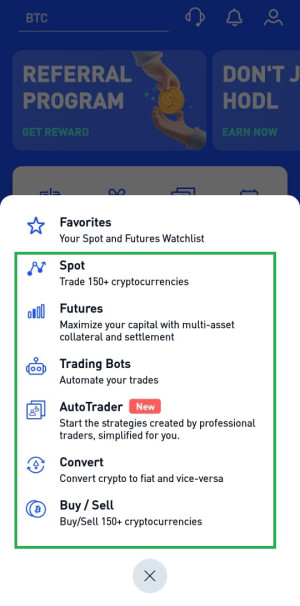
btzo app center quick access button
center quick access button

Bottom Navigation Menu

Always-visible menu for core functions:

  • Home: Your main dashboard and portfolio
  • Markets: All available trading pairs and coins
  • Earn: Passive income opportunities
  • Wallet: Your asset management hub

Market Analysis Tools

  • Hot Section: Currently trending coins
  • Gainers: Best performing assets
  • Losers: Coins experiencing drops
  • Volume: Most actively traded cryptocurrencies

Quick Action Features

Fast access to essential functions:

  • One-Tap Trading: Quick buy/sell options
  • Price Alerts: Set notifications for price movements
  • Favorite Coins: Mark and track preferred cryptocurrencies
  • Market Updates: Real-time price change percentages

How to Get Started and Navigate

1. Download and Setup

  • Download: Go to BTZO official website → scroll down to the end of the homepage  → Bottom left corner has the QR code to BTZO app APK file download or navigate to header and find a download icon and start downloading
  • Install: Wait for installation to finish
  • Sign Up: Create your account with email

2. Finding Your Way Around

The BTZO App uses simple navigation:

Bottom Menu (Always visible):

  • Home: Market data and quick actions
  • Markets: All trading pairs and analysis
  • Earn: Staking and passive income options
  • Wallet: Your asset management

Center Quick-Access:

  • Blue Equilibrium Button: Tap for Convert, OTC, AutoTrader, Wallets
  • Easy Selection: Choose your desired function
  • Fast Return: One tap back to main screen

Market Navigation:

  • Tab Switching: Move between Hot, Gainers, Losers, Volume
  • Scrollable List: Browse through all available coins
  • Quick Search: Find specific cryptocurrencies

Quick Tips for Beginners

  • Check Gainers/Losers daily to spot trends
  • Use the center button for quick trading actions
  • Set up price alerts for your favorite coins
  • Explore all market tabs for complete market view
  • Bookmark frequently used features for faster access

Ready to Start Trading?

Knowing your BTZO App dashboard makes trading easier and less stressful. You’ve seen how to:

  • Monitor live market data effectively
  • Access trading tools through the center button
  • Navigate between different app sections
  • Analyze market trends using various tabs
  • Execute trades quickly and efficiently

The BTZO App gives you everything for successful crypto trading in one place. The clean design with the prominent center button and organized bottom menu helps beginners learn fast while providing quick access to all essential features.

Download the BTZO App now and start your crypto journey with confidence!

Frequently Asked Questions

Fixing Login Problems

 Currently, the BTZO App is available only for Android devices. Soon we”ll be launching in App store too

The blue equilibrium button is your quick-access menu for Convert, OTC trading, AutoTrader, and Wallet management. It puts the most used features one tap away.

You can always view the most recent prices and percentage changes for all listed cryptocurrencies thanks to the BTZO App’s real-time market data updates.

Leave a Reply

Your email address will not be published. Required fields are marked *